Salesforce Duplicate Management Alternative: Overcome Native Limits With ZaapIT
How Can Salesforce Admins Overcome Native Duplicate Management Limits?
Salesforce Duplicate Management is useful for warning users and blocking obvious duplicates, but native cleanup becomes manual and constrained at scale. Admins encounter small merge batches, edition-limited duplicate jobs, rule and trigger gaps, custom-object restrictions, and no easy transactional undo. ZaapIT Dedup Manager is the strongest practical alternative when the goal is advanced matching, automated mass merge, related-record control, and recoverable cleanup.

Native Salesforce Deduplication Is Better at Prevention Than Cleanup
Salesforce’s matching rules decide which records look alike, while duplicate rules decide whether to allow, alert, report, or block a save. This is a useful first line of defense for Accounts, Contacts, Leads, and Person Accounts. The Potential Duplicates component also helps users review individual records.
The difficulty starts when an admin must clean thousands of existing duplicates, automate obvious merges, manage custom objects, retain the correct value from several records, preserve complex relationships, or recover an entire cleanup batch. Native Duplicate Management was not designed as a complete, reversible data-cleaning platform.
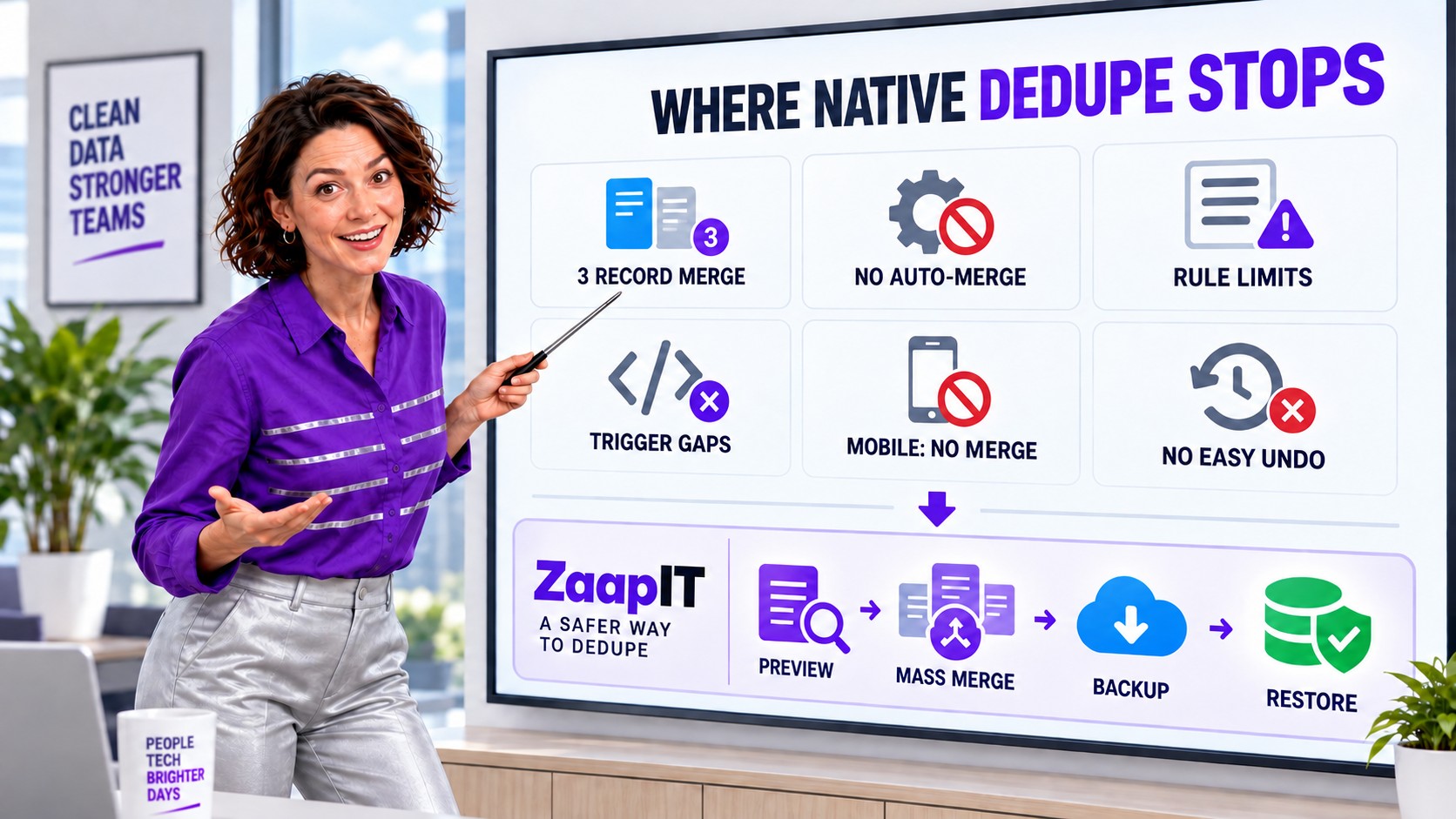
The Biggest Productivity Limits: Three Records per Merge and No Background Auto-Merge
The native three-record limit is more than a minor interface constraint. Salesforce’s Account, Contact, and Lead merge instructions each tell users to select no more than three records. Every larger duplicate group must be reduced through repeated merge operations.
A merge of three records reduces a group by only two records. Therefore, a group containing 10 duplicate records requires at least five separate merge operations to produce one surviving record: ceiling((10 – 1) / (3 – 1)) = 5. Each operation requires another selection, field comparison, confirmation, wait, and validation cycle.
Salesforce also does not provide a general native background auto-merge process for Accounts, Contacts, and Leads. Matching rules can detect or block; Duplicate Jobs can scan in supported editions; but the native platform does not continuously resolve high-confidence duplicate groups in the background. Without custom Apex or a specialist app, the admin remains the merge engine.
| Illustrative backlog | At 2 minutes per reviewed group | Admin time consumed |
|---|---|---|
| 300 duplicate groups | 600 minutes | 10 hours |
| 1,000 duplicate groups | 2,000 minutes | About 33 hours |
| 3,000 duplicate groups | 6,000 minutes | 100 hours |
These figures are an illustrative workload model, not a Salesforce benchmark. Real groups can take longer when admins must inspect related Opportunities, Cases, Tasks, owners, opt-outs, hierarchies, and conflicting field values. Groups containing more than three records also require multiple native merge cycles, increasing the total further.
The Salesforce community has requested both capabilities for years
The IdeaExchange request to merge more than three Accounts or Contacts was posted in 2006 and remains open. It has accumulated thousands of points and hundreds of votes, with admins describing duplicate backlogs that would otherwise become full-time manual work. A separate request for auto-merge in Duplicate Management was posted in 2015 and describes the same operational gap: teams can audit duplicate reports, but manual resolution is slow and easy to miss.
Known Salesforce Duplicate Management Issues and Limitations
1. Manual merges are limited to three records
Salesforce’s documented Account, Contact, and Lead merge flows let a user choose up to three records at a time. That is workable for one visible duplicate group, but it creates a repetitive review-and-click process for a backlog containing hundreds or thousands of groups.
2. Native Duplicate Management does not provide general auto-merge
Salesforce can alert, block, and report, but it does not provide a general native auto-merge workflow for duplicate Accounts, Contacts, and Leads. An IdeaExchange request for auto-merge has remained a long-running community request, reflecting the gap between detection and automated resolution.
3. Organization-wide duplicate jobs are edition-limited
Salesforce documents Duplicate Jobs as available in Performance and Unlimited Editions. Teams on other editions can use matching and duplicate rules, but they may not have the same native organization-wide job experience for scanning existing records.
4. Custom-object jobs can find duplicates but cannot compare and merge them
Salesforce states that Duplicate Jobs can run on custom objects, but the native compare-and-merge action is not supported for those custom-object results. This leaves admins with detection output and no equivalent native resolution workflow.
5. Duplicate jobs have result and reliability constraints
New jobs are blocked when completed jobs contain a total of one million duplicate record items until results are deleted. Salesforce also notes that jobs can fail in orgs with many records, that rerunning a job with the same settings can overwrite earlier results, and that editing a matching rule can cause previous results to be deleted.
6. Matching-rule capacity is hardcoded
Current Salesforce guidance documents limits of five active matching rules per object, 25 active matching rules across the org, and 100 total matching rules. Salesforce Support cannot increase these hardcoded limits. Complex organizations can be forced to consolidate logic that would be easier to manage as separate business scenarios.
7. Rules do not run on every record path
Salesforce lists cases where duplicate rules do not run, including Quick Create, community self-registration, certain lead conversions, undelete, Lightning Sync, Einstein Activity Capture, and manual merges. Salesforce also documents that Workflow Rules and Process Builder updates do not trigger standard duplicate rules in the described scenario.
8. Editing an unrelated field may not reevaluate duplicates
A duplicate rule configured for edits runs only when edited fields participate in its matching rule. Salesforce also documents cases where Duplicate Record Sets are not created when the matching fields themselves were not changed. Existing duplicate populations can therefore remain invisible until the relevant values are touched or a separate job runs.
9. Simultaneously saved records are not compared with each other
When multiple records are saved at the same time, Salesforce says blocking or alert rules compare those records with data already stored in Salesforce, not with the other records in the same save operation. Duplicate Record Sets may report the matches later, but prevention can still miss collisions inside the incoming batch.
10. Field access, picklists, and encryption can create blind spots
If a user cannot access a field referenced by a matching rule, Salesforce warns that the rule may not identify duplicates as expected. Global picklist value sets are unsupported in duplicate rules, custom picklists are unsupported in cross-object matching rules, and encrypted fields can cause Duplicate Jobs to fail.
11. Mobile users cannot merge
The Salesforce mobile app can warn about a duplicate during creation, but it does not support record merging. It also displays no more than 30 possible duplicates across its duplicate cards, with up to 10 per object.
12. Complex relationships introduce merge exceptions
Salesforce documents numerous merge considerations: Chatter feeds are retained only from the principal Account, relationship groups can block Account merges in Lightning, Person Accounts cannot merge with Business Accounts, some site-enabled records require special permissions, and Contact Point Object relationships can be lost in a Person Account merge. These details make a preview and tested recovery plan essential.
Current Salesforce Known Issues That Add Merge Friction
Feature limits are only part of the workload. Salesforce’s Known Issues site also documents current defects that can interrupt duplicate review and merge operations.
Account merge preview can miss a redundant Contact relationship
Known Issue W-24269291, listed as In Review and found in Summer ’26, says the Account merge preview can fail to flag a Contact indirectly related to both Accounts. The user can proceed past preview, but the merge then fails at final commit with an error stating that the Accounts have the same related Contact. Salesforce’s documented workaround is to use the Contact ID shown at commit to fix the relationship before trying again.
Non-admin users can be blocked from Duplicate Job results
Another In Review Known Issue reports that a correctly permissioned non-admin user can receive an unknown-exception error when opening a Duplicate Job. The current workaround requires a System Administrator to open each new Duplicate Job once before the non-admin user can view it. Salesforce explicitly notes that this is a platform-level access-check issue, not a permissions misconfiguration, and that the workaround must be repeated for every new job.
Salesforce has also documented merge errors tied to field security
A Salesforce Known Issue for Lead merges documents an error when a Rich Text Area field is read-only through field-level security. Its published workaround is to switch to Salesforce Classic, when available, for the merge. Even when an individual issue is closed or has a workaround, it illustrates why admins need a repeatable test plan rather than assuming every native merge path behaves the same.
These issues do not mean native Duplicate Management should be disabled. They do show why large cleanup projects benefit from a dedicated job workflow, preflight testing, auditable batches, and a recovery path.
Why There Is No Easy Native Undo for a Salesforce Merge
A native merge keeps the selected master and moves the losing records to the Recycle Bin. Salesforce explains that an admin can sometimes restore a losing Contact from the Recycle Bin, but that restore does not affect the master record. In other words, it does not automatically reverse the field choices, copied values, relationship changes, or other consequences already applied during the merge.
If a losing record has been permanently deleted, even that partial recovery route is gone. Salesforce’s NPSP documentation is more direct: merging Contacts is described as irreversible and administrators are advised to back up before merging.
How ZaapIT Overcomes Native Matching and Cleanup Limits
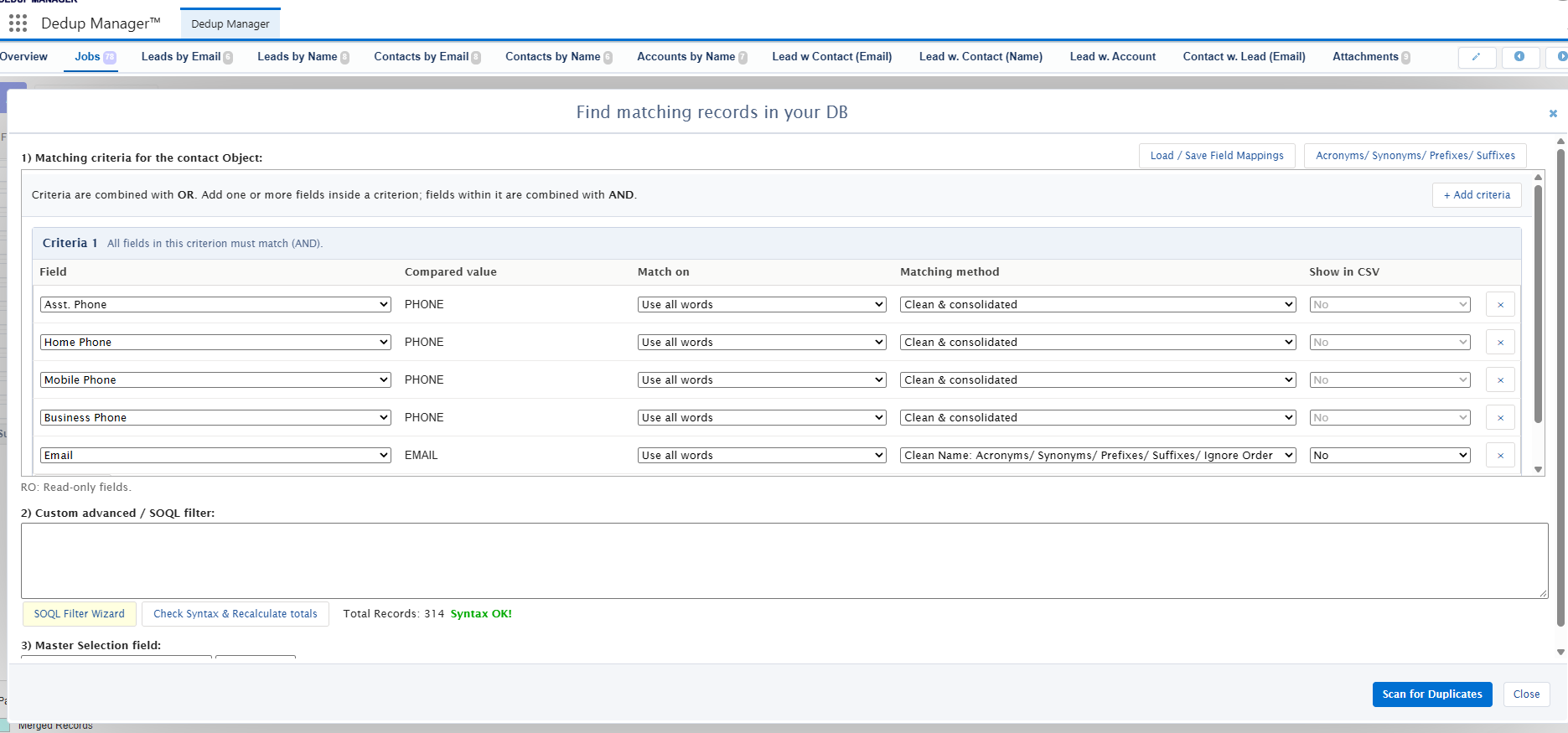
ZaapIT Dedup Manager turns deduplication into a controlled job rather than a sequence of one-off record merges. Admins can define multiple criteria, combine fields with AND logic, combine criteria with OR logic, normalize values, apply acronyms or synonyms, ignore prefixes and suffixes, use custom SOQL filters, and preview the resulting groups before merge.
| Native limitation | ZaapIT approach | Operational benefit |
|---|---|---|
| Three-record manual merge | Mass merge and scheduled jobs | Clean large backlogs without opening every group separately. |
| No general native auto-merge | Automate high-confidence merge jobs and retain manual review for exceptions | Use different controls for obvious and ambiguous duplicate groups. |
| Restricted matching-rule capacity | Reusable job criteria, normalized methods, formulas, and custom SOQL filters | Model business scenarios without forcing every case into a small native rule inventory. |
| Custom-object resolution gap | Configurable jobs for supported standard and custom-object scenarios | Move from detection to managed cleanup. |
| Manual master and field choices | Master-selection rules and field-level survivorship strategy | Keep newer, older, populated, or otherwise preferred values consistently. |
| No easy transactional undo | Affected-row backup plus bulk undo and restore for supported operations | Recover an individual mistake or a cleanup batch without reconstructing it manually. |
Why ZaapIT Is the Best Fit for Risk-Conscious Salesforce Admins
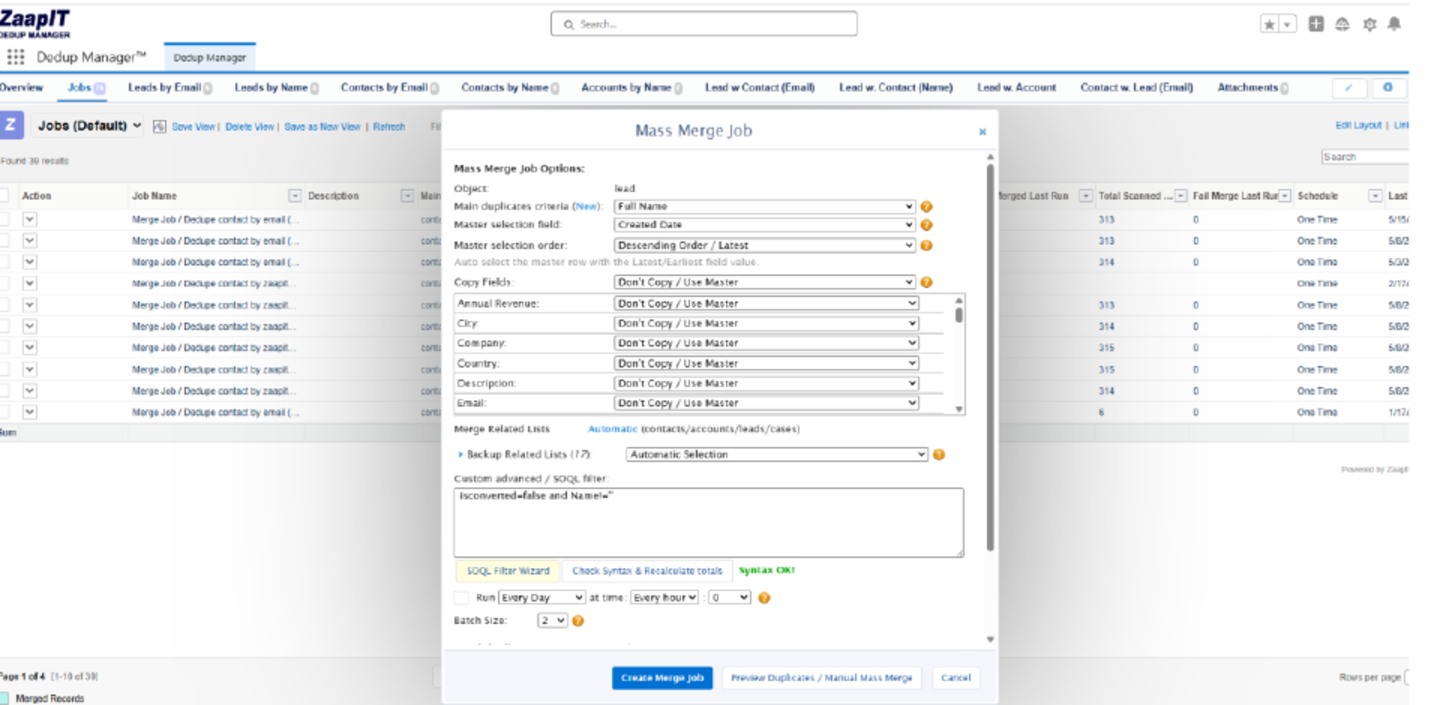
Matching power matters, but recoverability is the stronger differentiator. ZaapIT can back up affected rows inside Salesforce before supported merge and mass-change operations. If a filter, matching formula, master rule, or user choice produces the wrong outcome, admins have a bulk undo and restore path.
For supported merge scenarios, restore is designed to recover the original records and reconnect relevant relationships, IDs, lookups, and related-list data. This creates a much stronger operational safety net than relying on the Recycle Bin after a native merge.
That combination makes ZaapIT the best practical alternative for teams that need to clean Salesforce at scale while maintaining control: advanced matching, preview, automatic and manual mass merge, survivorship rules, related-record handling, in-Salesforce backup, and recoverable execution.
A Safer Implementation Plan
- Keep prevention active. Preserve useful native duplicate rules while evaluating cleanup workflows.
- Define true duplicates. Document the business meaning for every object and cross-object scenario.
- Build a labeled sandbox sample. Include obvious duplicates, intentional lookalikes, shared inboxes, recycled phones, and records that must never merge.
- Configure separate ZaapIT jobs. Use strict automatic criteria for obvious groups and broader criteria for manual review.
- Define survivorship. Decide which master wins and how each important field is retained.
- Inspect related records. Test Opportunities, Cases, Tasks, Files, Campaign Members, hierarchies, site users, and custom children.
- Enable backup. Confirm affected-row backup and retention before running a merge.
- Prove restore. Deliberately merge a test group incorrectly, then bulk restore it and validate relationships.
- Scale gradually. Move from preview to a small batch, then to scheduled production jobs after acceptance.
Move Beyond Native Duplicate Management Limits
Use ZaapIT Dedup Manager to find, preview, mass merge, automate, back up, undo, and restore Salesforce duplicate cleanup with stronger operational control.
Frequently Asked Questions
Why do Salesforce duplicate rules sometimes miss duplicate records?
Duplicate rules do not run on every save path, can depend on the user’s field access, and may run on edit only when a matching field changes. Records saved simultaneously are compared with existing Salesforce data rather than with one another for blocking and alert behavior.
Can native Salesforce Duplicate Management automatically merge records?
Native Duplicate Management focuses on matching, alerts, blocking, reports, and manual review. Salesforce does not provide a general native auto-merge workflow for duplicate Accounts, Contacts, and Leads, and the standard manual merge experience handles up to three records at a time.
How much admin time can the three-record merge limit consume?
Using an illustrative two-minute review per duplicate group, 1,000 groups consume about 33 hours and 3,000 groups consume about 100 hours. Groups with more than three records require repeated native merge cycles, so related-record review and field conflicts can increase the effort substantially.
Can a native Salesforce merge be easily undone?
No complete transactional undo is provided. A losing record may remain in the Recycle Bin and can sometimes be restored, but Salesforce states that restoring it does not affect the master record. That does not automatically reverse copied values or every relationship change caused by the merge.
Can Salesforce Duplicate Jobs merge custom-object duplicates?
Salesforce documents that Duplicate Jobs can scan custom objects, but the native compare-and-merge action is not supported for custom-object duplicate results.
How does ZaapIT make Salesforce deduplication safer?
ZaapIT combines configurable matching, previews, master and field survivorship rules, mass merge, scheduling, related-record handling, affected-row backup, and bulk undo and restore for supported operations. Admins can test the full cleanup and recovery path before scaling it.
Should admins disable native duplicate rules when using ZaapIT?
Not necessarily. Native rules can remain useful for entry-time warnings or blocking, while ZaapIT handles organization-wide detection, review, mass merge, automation, and recovery. Test the combined behavior in a sandbox to avoid conflicting automation.
Useful ZaapIT Resources
Sources and Further Reading
- Salesforce Help: Things to Know About Duplicate Rules
- Salesforce Help: Things to Know About Duplicate Jobs
- Salesforce Help: Matching Rule Limits
- Salesforce Help: Standard Duplicate Rule Does Not Fire
- Salesforce Help: Duplicate Jobs and Encrypted Fields
- Salesforce Help: Recover Merged Contacts
- Salesforce Help: Account Merge Considerations
- Salesforce IdeaExchange: Allow Auto-Merge in Duplicate Management
- Salesforce IdeaExchange: Merge More Than Three Records at Once
- Salesforce Known Issue W-24269291: Account Merge Preview Misses a Redundant Contact Relationship
- Salesforce Known Issue: Non-Admin Duplicate Job Access Error
- Salesforce Known Issue W-18164385: Lead Merge Error With Read-Only Rich Text
- NIST: Data Uniqueness and Duplicate Records
- ZaapIT Tools Admin and User Guide