Salesforce Text Formatting and Standardization: A Practical Data Quality Guide
How Can Salesforce Admins Standardize Messy Text Fields Without Breaking Reports?
Salesforce text formatting problems look small until they split reports, weaken duplicate matching, break imports, and make users distrust CRM data. This guide shows how admins can standardize names, phone numbers, emails, company suffixes, addresses, country and state values like USA to United States and NY to New York, and free-text fields with a controlled ZaapIT cleanup workflow.
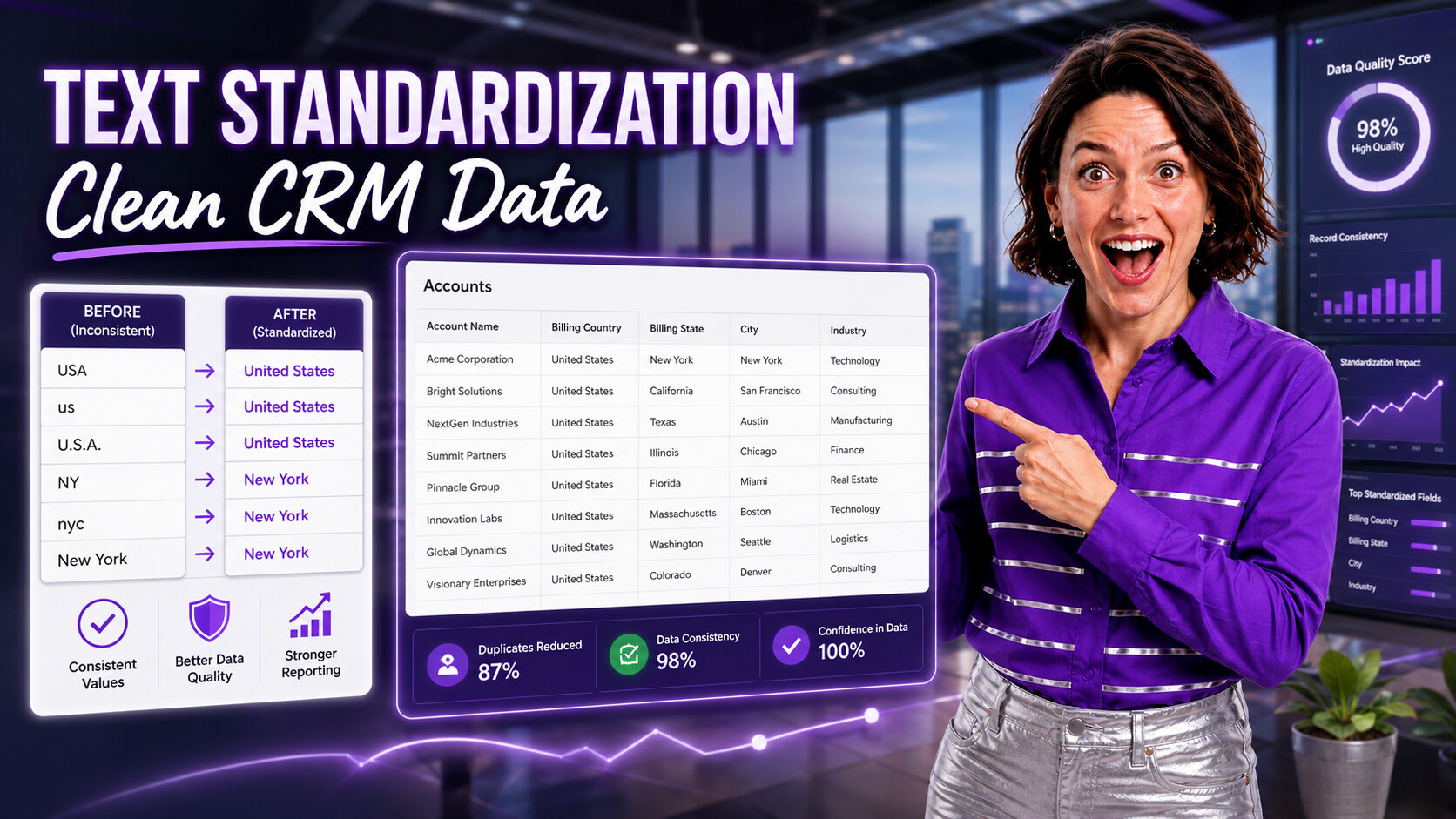
Why Text Formatting Becomes a Salesforce Data Quality Issue
Text fields are where CRM mess usually begins. Users type the same company name in different ways. Imports bring uppercase names, mixed phone formats, extra spaces, and inconsistent country or state values. Integrations add their own casing and abbreviations.
Those differences create real admin work. A dashboard grouped by Account Name can split one customer into several rows. Salesforce reports can also fragment totals when the same region appears as USA, U.S.A., United States, NY, N.Y., and New York. Duplicate rules miss matches because the values are close but not standardized. Campaign segmentation becomes unreliable because titles, countries, industries, and source names are not consistent.
Common Fields Salesforce Admins Should Standardize
Text cleanup should start with the fields that drive business decisions: matching rules, duplicate jobs, routing automation, dashboards, marketing segments, territory assignments, and integrations.
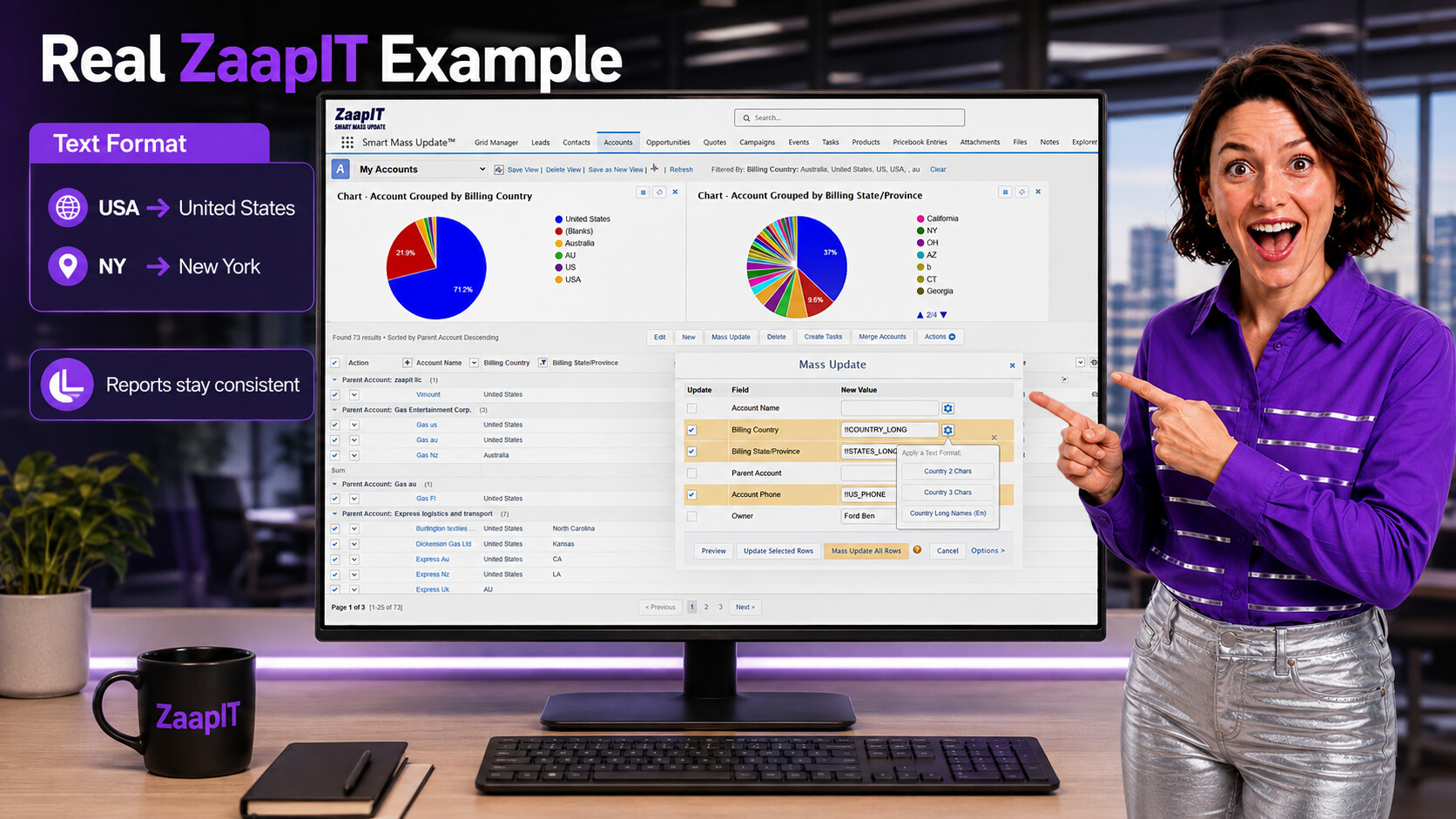
The real ZaapIT screen example shows an admin applying Text Format options inside Smart Mass Update, including long country and state/province formats. That lets teams turn values like USA into United States and NY into New York before those differences split Salesforce reports, dashboards, and grouped charts.
A Safer Workflow for Formatting Existing Salesforce Data
The safest cleanup path is review first, change second. Admins should not mass-update thousands of records just because a formula or spreadsheet looks reasonable. Create a focused work set, preview the changes, test in sandbox, and keep an audit trail.
| Step | Admin decision | ZaapIT role |
|---|---|---|
| Find the pattern | Which fields are inconsistent, and which reports or processes depend on them? | Filter records in a grid and expose messy values for review. |
| Define the standard | What should correct casing, spacing, suffixes, regions, and formats look like? For example, should USA become United States and NY become New York? | Use Text Format rules and previewable transformations. |
| Test safely | Does the rule behave correctly with edge cases, blank values, international data, and imports? | Run the same cleanup pattern on a small batch or sandbox set. |
| Update in batches | Which records are approved, skipped, or need manual review? | Use mass update and inline edit for controlled cleanup. |
| Prevent drift | How will new imports and user edits follow the same standard? | Combine import cleanup, validation, duplicate review, and scheduled hygiene checks. |
How ZaapIT Helps With Text Formatting and Standardization
ZaapIT gives admins a practical cleanup layer inside Salesforce. Instead of exporting data to spreadsheets, editing values manually, and re-importing with risk, admins can work from a Salesforce-connected grid and apply controlled updates.
- Text Format tools: standardize casing, spacing, suffixes, country/state values such as USA to United States and NY to New York, and common text patterns.
- Mass Inline Edit: review and correct values without opening records one by one.
- Mass Update: apply approved changes to a filtered set of records.
- Import preparation: clean incoming CSV or copy-paste data before it creates new inconsistencies.
- Duplicate cleanup: improve matching quality by making names, emails, phones, and company fields more comparable.
Start with the ZaapIT Text Format Complete Guide, then use the Salesforce Text Format tutorial for a practical walkthrough. For record-by-record review, pair it with Salesforce Mass Inline Edit.
Where Standardization Improves Duplicate Management
Salesforce duplicate management relies on matching rules and duplicate rules. Salesforce Help explains that matching rules identify potential duplicates, while duplicate rules decide what happens when a match is found. If the input values are inconsistent, those rules have a harder job.
Standardization can improve duplicate review before admins merge or block records. For example, lowercased emails, normalized phone numbers, and consistent company suffixes make it easier to compare Leads, Contacts, and Accounts.
For deeper cleanup, use DEDUP-Manager, Find Duplicate Records in Salesforce, and the Mass Merge tutorial.

What to Standardize Before Imports
Imports are one of the fastest ways to spread messy text across Salesforce. Before loading data, review the CSV for casing, whitespace, email format, phone format, country/state values, picklist values, and duplicate candidates.
Salesforce Help notes that active duplicate or matching rules can block Data Loader inserts when records do not pass duplicate checks. That is another reason to clean and compare source data before importing it.
Use the ZaapIT import tutorial and CSV vs Salesforce fuzzy matching tutorial to catch conflicts before they become production records.
Formatting Rules That Usually Work Well
- Trim spaces: remove leading, trailing, and repeated whitespace from names, emails, and company fields.
- Normalize email casing: store emails in lowercase to improve matching and prevent duplicate-looking variants.
- Use consistent phone patterns: separate local formatting decisions from country-code handling.
- Standardize company suffixes carefully: keep legal meaning where it matters, but avoid unnecessary variation in reporting fields.
- Protect free-text context: do not over-format notes, descriptions, support comments, or customer-provided text where meaning can be lost.
Governance: Keep Clean Data From Drifting Again
A one-time cleanup helps, but Salesforce data quality decays when every import, integration, and manual edit follows a different standard. Document the rules, train users, and review the fields that feed automation and executive reports.
Use dashboards or recurring reviews to track blank key fields, invalid formats, duplicate candidates, recently imported records, and exceptions that require manual review. For broader planning, see the Salesforce Customer Data Management guide and advanced duplicate matching strategies.
Standardize Salesforce Text With More Control
Use ZaapIT to filter, preview, standardize, and update messy Salesforce text values so reports, matching rules, imports, and automation stay reliable.
Frequently Asked Questions
Why should Salesforce admins standardize text fields?
Admins should standardize text fields because inconsistent names, countries, states, phone numbers, emails, and source values can split Salesforce reports, reduce duplicate matching accuracy, and make automation harder to trust.
Which Salesforce text values should be cleaned first?
Start with values used by reports, dashboards, duplicate rules, imports, routing, segmentation, territories, and integrations. Common examples include Account Name, Billing Country, Billing State/Province, phone, email, Lead Source, industry, and company suffixes.
How do USA to United States and NY to New York changes help reports?
Those changes help because Salesforce reports group text values exactly as they are stored. If records use USA, US, United States, NY, N.Y., and New York, report totals can split into separate buckets even when they describe the same country or state.
How does ZaapIT help with Salesforce text standardization?
ZaapIT helps admins filter the affected records, preview formatting rules, review exceptions in a grid, apply approved updates in bulk, and keep cleaner values available for reporting, matching, imports, and automation.
Can text standardization improve Salesforce duplicate matching?
Yes. Normalized text makes records easier to compare because duplicate rules and review workflows can evaluate cleaner names, emails, phone numbers, company suffixes, countries, and state values instead of many inconsistent variants.
Should admins preview Salesforce text updates before applying them?
Yes. Previewing helps admins catch edge cases, protected values, imported abbreviations, and records that need manual review before a text-format rule changes a larger Salesforce data set.
Useful ZaapIT Resources
- ZaapIT Text Format Complete Guide
- Salesforce Text Format Tutorial
- Salesforce Mass Inline Edit Tutorial
- CSV vs Salesforce Fuzzy Matching Tutorial