How Maryland Healthcare Teams Clean Referral-Site Records
Why Referral-Site Identity Matters for Maryland Healthcare Teams
A Maryland health-system outreach team sees the same referral clinic entered twice after a directory import and a sales handoff, while another clinic in the same network is a genuinely different location. Salesforce reports split referral-source activity across the duplicates and overcount active sites. This anonymized composite scenario follows an illustrative 15,000-row review of site Accounts and related records, using ZaapIT preview, backup, controlled updates, bulk undo, and restore where applicable. It uses no patient-level data.
Why Referral-Site Identity Matters in Maryland
Maryland’s Office of Health Care Quality reported 23,095 provider licensees across its categories as of July 1, 2025, including 123 federally qualified health center licensees and 61 hospital licensees. These are license counts, not a count of Salesforce referral sites. The nonprofit Maryland Hospital Association’s 2025 economic-impact report says hospitals employ more than 168,000 people statewide. In a large, varied care landscape, an outreach CRM needs to distinguish a specific clinic location from its parent network so routing and coverage reports do not conflate them. A CMS provider-directory accuracy review identified deficient provider-location data and a lack of internal accuracy audits among many reviewed organizations. Those findings are not measurements of Maryland referral sites, but they explain why a Maryland outreach team should verify a clinic’s physical location and current contacts rather than trust a copied directory row.
Use Case: A Referral Source Appears Twice
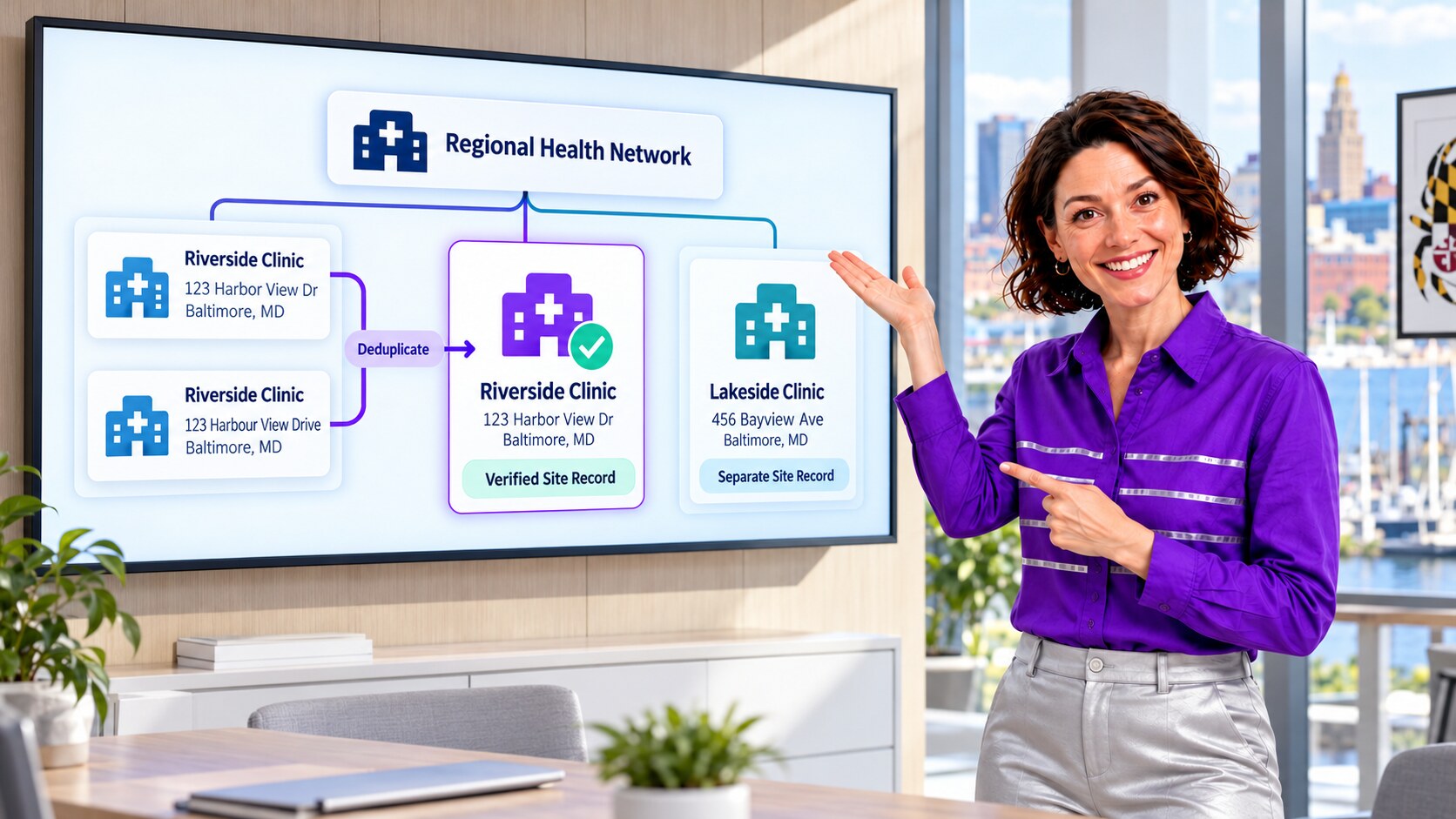
One directory feed calls a Baltimore location “Riverside Clinic” with an abbreviated street suffix. A partner spreadsheet spells out the street name, and an outreach user creates a second Account after not finding the first. A nearby “Lakeside Clinic” belongs to the same parent network but has a different address and referral coordinator. The duplicate Riverside records split calls and partner activity; merging Lakeside into Riverside would erase a distinct referral relationship. The example is fictional and illustrates the identity decision, not actual Maryland facilities.
The admin sets the grain at the verified physical referral site. The parent health network is a separate relationship, not a reason to combine all locations. Site address, authoritative facility ID where available, active location status, source-system ID, and outreach owner all require review. Names or postal addresses alone can be stale, reused, or reformatted.
| Candidate signal | Admin check | Reason |
|---|---|---|
| Clinic name and address variant | Compare authoritative directory, suite, and effective date. | Abbreviations create duplicates; colocated services may still be distinct. |
| Facility or source ID | Confirm the ID’s issuing system and location granularity. | A network ID must not stand in for an individual site. |
| Parent network | Verify corporate relationship and site-level owner. | Related clinics can share a parent but keep separate activity. |
| Outreach history | Inspect tasks, Contacts, referral-source custom records, and open follow-up. | Changing an Account must not strand work or distort reporting. |

Why Salesforce’s Default Checks Need a Site Policy
Salesforce’s standard Account matching rule uses combinations of name, address, city, ZIP, phone, and website. Salesforce says a new or edited record needs an Account Name plus City or ZIP for accurate matches. Those fields may be missing from referral intake or inconsistent across directory feeds. An alert can identify a candidate, but it cannot determine whether two entries are the same licensed location, colocated services, or different clinics under one network. Admins can configure additional rules after defining that distinction.
Salesforce Help recommends parent-child Accounts for organizations with multiple locations. The admin therefore preserves each verified clinic site as a separate Account and links it to the correct parent network, merging only confirmed duplicate records for the same site. If referral activity is stored in a custom object, the team also checks how that object is keyed and related before any merge.
A Controlled ZaapIT Runbook for 15,000 Illustrative Rows
- Baseline: export site Accounts, parent IDs, facility and source IDs, addresses, owners, Contacts, open outreach, and referral-source reporting counts. Keep the illustrative 15,000-row scope explicit.
- Profile candidates: use ZaapIT filters and duplicate review to surface address, name, and source-ID variants. Flag shared network names and colocated clinics as exceptions for human review.
- Approve site identity: compare candidates with the authoritative directory and local outreach owner. Record whether each group is one site, separate sites, a closed location, or a parent network.
- Preview and back up: inspect proposed updates and relationships, then preserve affected values and an old-to-new Account ID crosswalk before production changes.
- Standardize and consolidate: correct approved site names, address formats, IDs, and parent links. Merge only confirmed duplicates after testing object behavior and related-list handling in the target org.
- Batch and monitor: use controlled batches and watch flows, directory integrations, owner assignment, custom referral objects, and open follow-up.
- Validate and recover: reconcile unique verified sites and activity by location against the baseline. Use ZaapIT bulk undo or restore for affected rows where applicable; test merge-specific and integration recovery separately.
Backup and bulk undo are a practical safety advantage for a large admin cleanup, but they do not replace sandbox testing, approval from the referral operations owner, or a separate privacy review. Use only organization-level and appropriately authorized contact data.

How the Team Confirms the Reports Are Better
The admin reruns referral-source reports by verified location and parent network. A reviewer samples formerly split Riverside-style records to confirm that outreach activity is visible from the surviving site, while separate Lakeside-style sites retain their own owner and history. Exception groups remain open until a human resolves them. The directory import then uses a stable site-level key and an approved address-normalization rule, reducing the chance that the next file recreates the duplicate.
- Count verified physical sites separately from parent networks.
- Keep unrelated clinics and services distinct even at a shared address.
- Reconcile tasks, Contacts, and custom referral-source links before and after each batch.
- Retain reviewer decisions, batch logs, backup scope, and restore test results.
Make Referral-Site Cleanup More Predictable
Use ZaapIT to review duplicate site candidates, standardize verified Salesforce records, and run controlled updates with backup, bulk undo, and restore where applicable.
Frequently Asked Questions
Should two Maryland clinics merge because they share a parent network?
No. Confirm each physical site, facility ID, address, owner, and referral history. Separate clinics can be linked to the same Parent Account without being merged.
Why do referral-source reports overcount clinics?
Directory imports, spreadsheets, and manual entry can create multiple Accounts for one site under different names or address formats. Activity then splits across records and location counts become unreliable.
What should an admin check before merging referral-site Accounts?
Check the authoritative site identity, source and facility IDs, suite and effective dates, parent network, owner, tasks, Contacts, custom referral objects, and any integration references. Ambiguous colocated services need human review.
Does a standard Salesforce duplicate alert prove two sites are the same?
No. Salesforce’s standard Account rule uses particular name and location combinations. It surfaces candidates; a facility-level policy and source verification decide whether two entries represent one site.
How does ZaapIT reduce risk in a large referral-site cleanup?
Admins can preview approved rows, back up affected values, update in controlled batches, validate site-level reports, and use bulk undo or restore where applicable. Merge-specific effects and external integrations should be rehearsed separately.
Useful ZaapIT Resources
Sources
- CMS: online provider-directory accuracy review, year two
- Maryland Department of Health: Office of Health Care Quality FY2025 report
- Maryland Hospital Association: 2025 Economic Impact Report
- Salesforce Help: Standard Account Matching Rule
- Salesforce Help: Manage Multiple Account Locations
- Salesforce Help: Custom Object Import Matching